Set up a pet fee
Updated 13 October 2026
Charge a fee for guests who bring pets. The fee is added only to stays with pets, at properties that allow pets, and can be charged once per stay or per pet.
Steps
Click your name at the bottom of the sidebar, then Settings. Open Pricing rules.
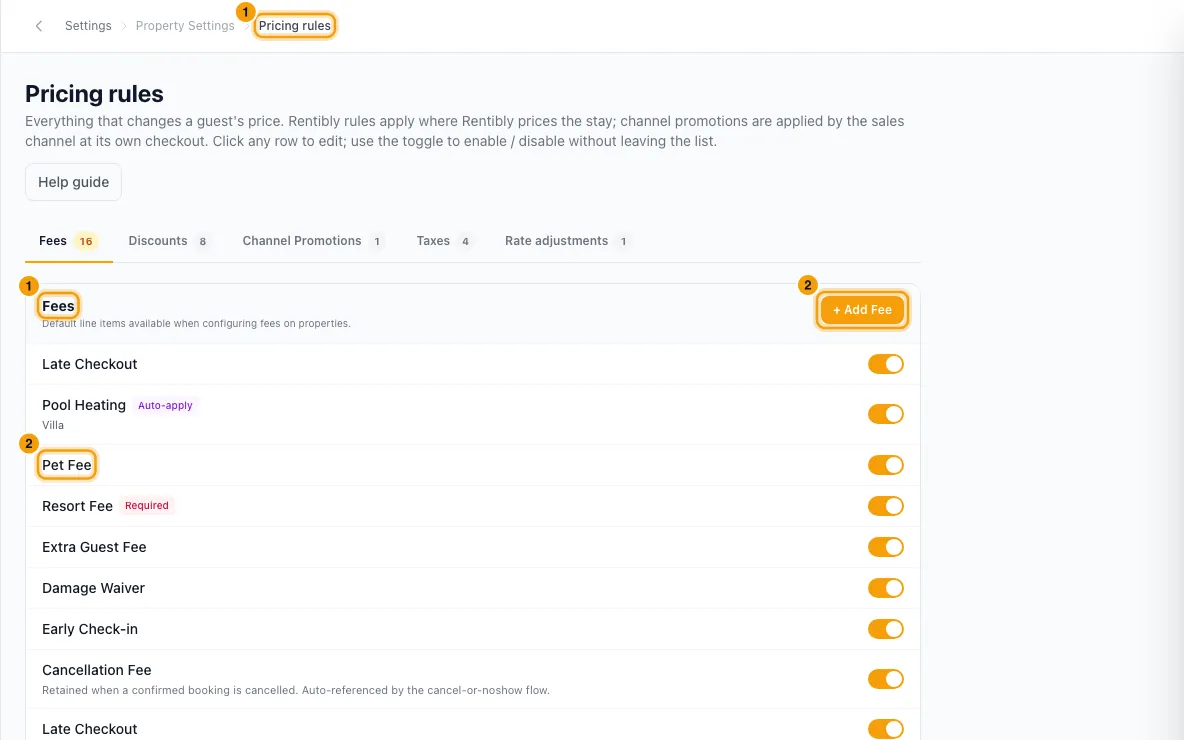
Add a fee (or open your existing pet fee). Set its Category to Pet.
Choose the Default fee type: Fixed (once per stay) or Per night. To multiply it by the number of pets, tick Charge per pet. For example, a per-night fee for two pets is then charged twice.
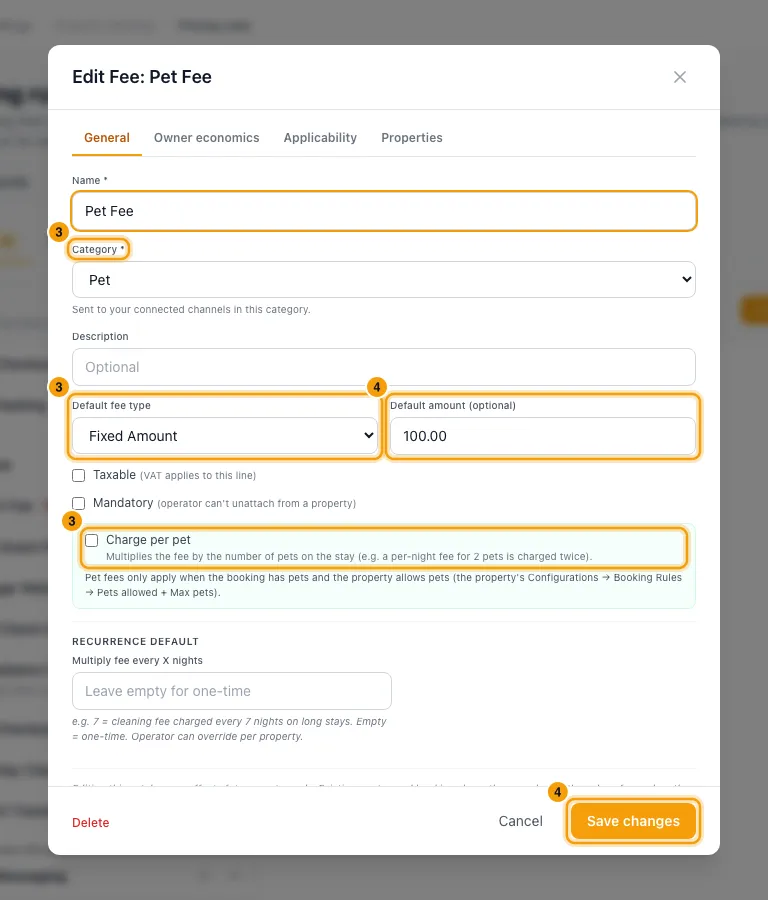
Enter the Default amount and click Save. Then attach the fee to your properties, or set it to auto-apply, the same way as any other fee.
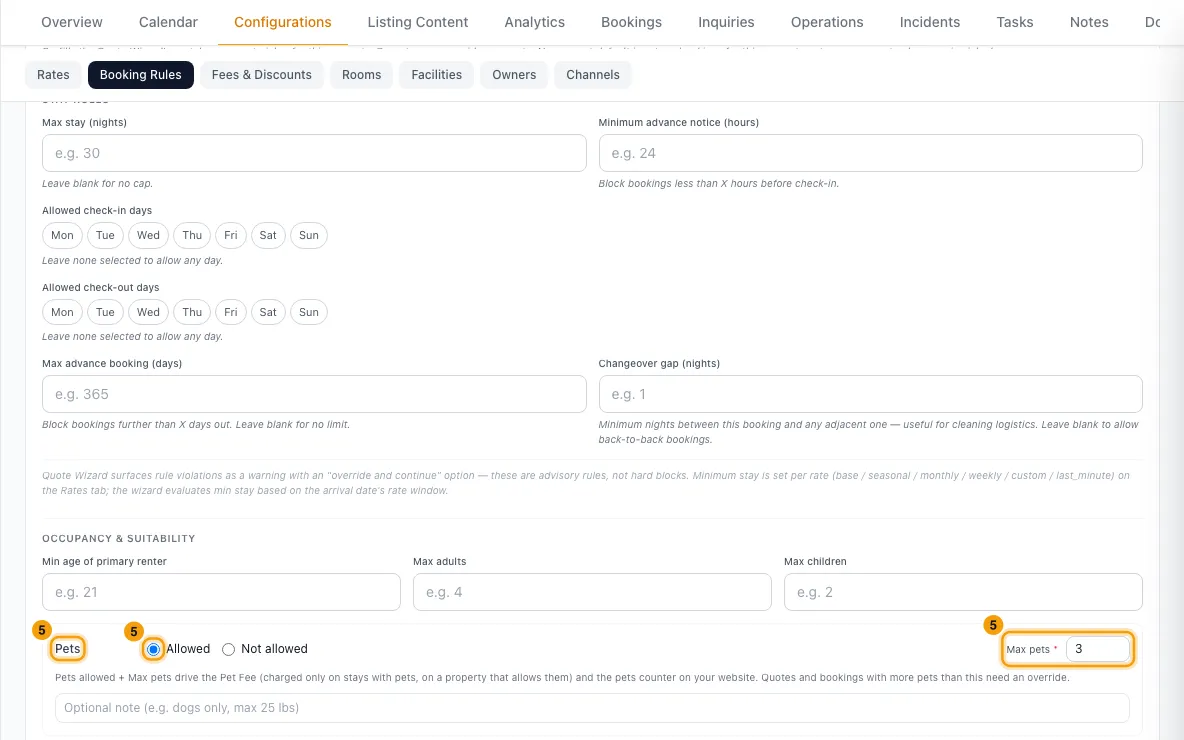
On each pet-friendly property, open Properties, go to Configurations → Booking Rules and click Edit. Under Pets, choose Allowed and enter Max pets. Click Save.
Good to know
- A pet fee is charged only when the stay has at least one pet and the property allows pets. Stays without pets never pay it.
- On a property that doesn't allow pets, its Fees & Taxes tab shows a warning on each pet fee (attached or auto-applied), and Booking Rules names them under Pets: the fee is never charged there until you turn on Pets allowed.
- Modify → Change Dates or Change Property warns before Apply recalculated charges removes a Pet Fee the booking already has.
- Charge per pet is available only for Fixed and Per night pet fees.
- Max pets is required when pets are allowed. Booking channels reject the property's rules without it.
- In the Quote Wizard, enter the guest's pets next to Guests. The Pet Fee is added to the quote automatically.
- Stays with pets from your website and booking widgets are accepted only at properties that allow pets, up to Max pets, and their price includes the Pet Fee.
- If you enter pets on a property that doesn't allow them (an override in the Quote Wizard), no Pet Fee is added automatically. Add one under Fees & Adjustments if you want to charge it.
- If you enter more pets than Max pets (also an override), the Pet Fee is still charged, and a Charge per pet fee is charged for every pet, not just up to Max pets. The Quote Wizard says so next to the warning and on Fees & Adjustments.
- Changing the pets on an existing booking (Modify → Number of Guests) doesn't re-price it. Add or remove the Pet Fee in the booking's Financials tab.
- Number of Guests shows a warning when the pets break the property's rules (pets not allowed, more than Max pets, or no Max pets set). It's only a warning: Save still records the pets, so you can correct what a channel sent.
- Pets are never counted as guests, so they don't affect the maximum number of guests or per-guest fees.
- On booking channels, a pet fee set to Charge per pet is sent as one amount (once per stay, or once per night), whatever the number of pets — so stays with 2 or more pets are under-charged on the channel. Pricing rules shows such a fee as Charged differently on channels.
- Bookings from connected channels arrive with the pets the guest gave the channel. Like the guest counts, you can correct them under Modify → Number of Guests, and your correction stays until the channel itself changes the pets.
Rentibly AI can help
- It can price a stay with pets, for example "2 adults and a dog", including the Pet Fee.
Still stuck?
Open Support from your profile menu in Rentibly, or email hello@rentibly.com — we answer fast.