Set up cancellation policies
Updated 13 October 2026
Define how much a guest gets back when they cancel. Policies are attached to quotes and bookings, and are sent to your connected channels.
Steps
Click your name at the bottom of the sidebar, then Settings. Under Property Settings, open Cancellation Policies.
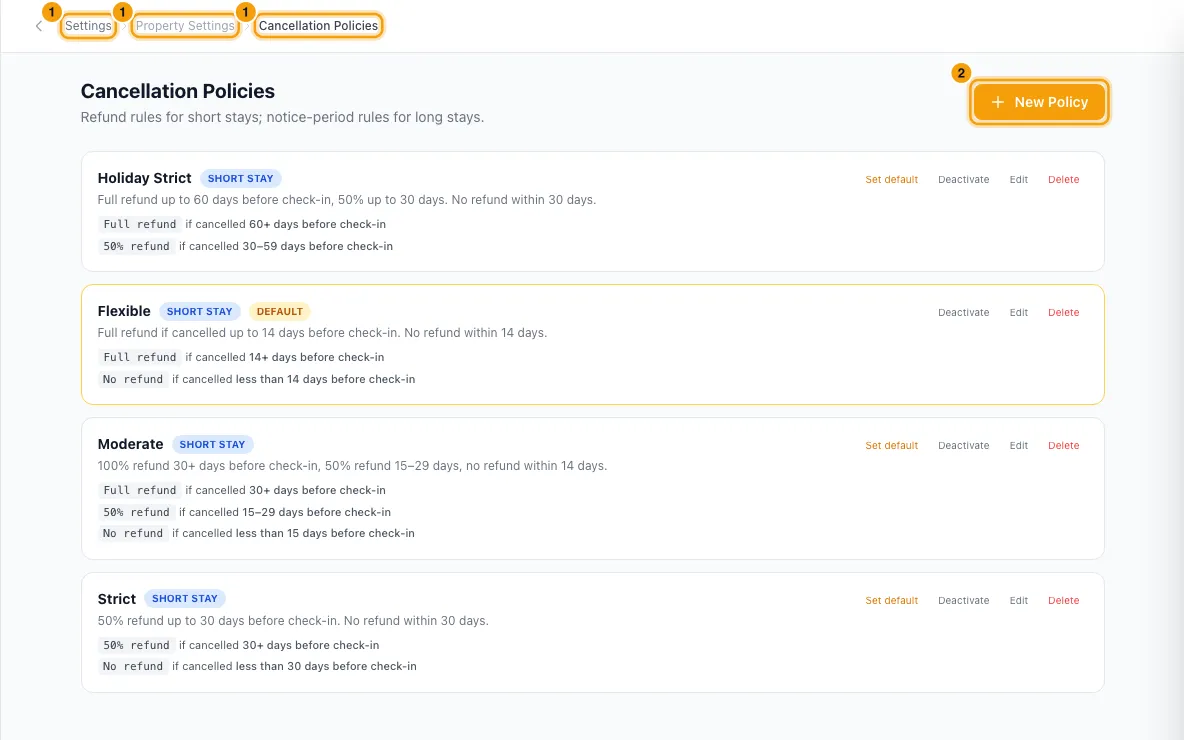
Click New Policy.
Choose a Policy Type. Short Stay refunds a percentage based on how many days before check-in the guest cancels. Long Stay sets a notice period before move-out, with a penalty if the notice is shorter.
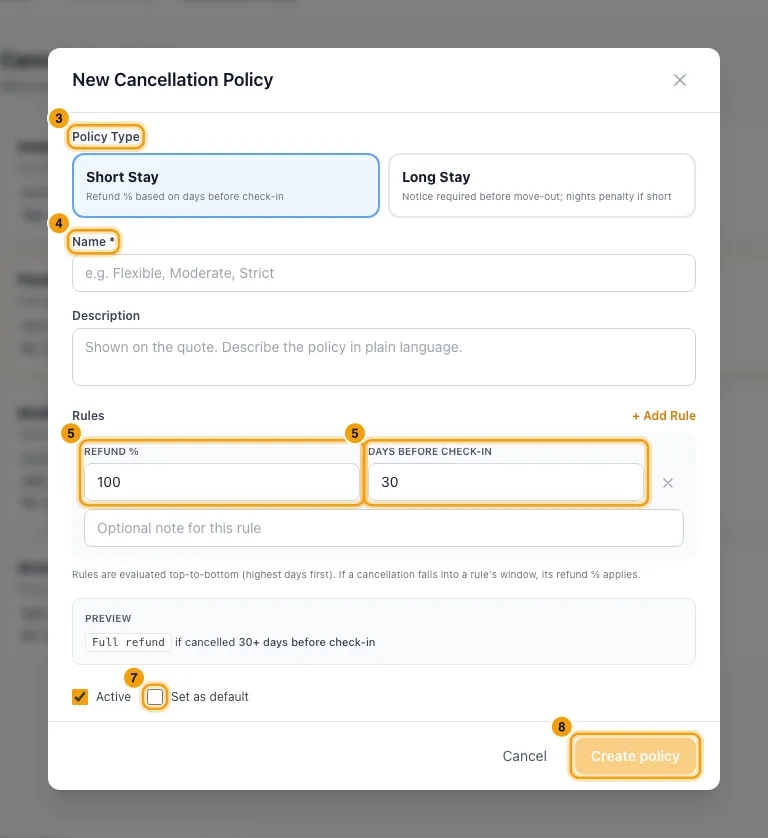
Enter a Name and a Description. The description is shown on the quote.
Set up the first rule, and add more with + Add Rule.
- Short Stay: enter Refund % and Days before check-in.
- Long Stay: enter Minimum notice (days) and choose a Penalty type: None (no penalty), N nights charged, % of total charged or Fixed amount. Then enter the nights, percent or amount.
- Each rule can have an optional note.
Check the Preview.
Leave Active ticked. Tick Set as default to make this policy the account default.
Click Create policy.
For one property: open the property from Properties, go to Configurations → Booking Rules and click Edit. Under Default cancellation policy, pick a policy, or Use account default. Click Save.
Good to know
- Rules are saved from the most days (or most notice) down. The first rule whose window the cancellation falls in decides the refund.
- On each policy in the list you can Set default, Deactivate (or Activate), Edit or Delete it.
- Only one policy can be the account default. Making a policy the default takes the mark off the old one.
- Which policy a booking gets: the property's own default if it is active, otherwise the account default if it is active, otherwise none.
- The Quote Wizard lists only active policies, marked (Property default) and (system default). A new quote starts on the property's default if it is active, otherwise on the account default. You can pick any active policy, or — No policy —. Once you pick one, changing the property no longer changes it.
- A quote and a booking keep their own copy of the policy's name, description and rules. Editing a policy later doesn't change quotes or bookings already made. When you cancel a booking, Rentibly shows the refund that copy allows (see Cancel a booking or mark a no-show).
- Bookings from channels don't get your policy. The channel's own policy applies to them.
- Delete is refused while any quote uses the policy. Use Deactivate instead. Properties that had a deleted policy as their default fall back to the account default.
- When you edit a policy, Applied to lists the active and onboarding properties that use it as their default, and how many quotes use it.
- Saving a policy doesn't send it to your channels. After you create or change one, open Channels & OTAs, click a connected channel such as Booking.com, go to the Policies synced step and click Sync policies now (or Sync policies again). One sync sends all your active short-stay policies at once, and marks your account default as the default.
- Long Stay policies are not sent to channels. A channel policy can only count penalties from booking or before arrival, so notice before move-out cannot be expressed there. The sync leaves them out. If your account default is a Long Stay policy (or, with no default, the first active policy in the list is), the sync is refused with a message saying so: make a Short Stay policy the default first.
- Some channels use their own policies instead, such as Agoda. See that channel's guide.
- You need the Settings permission to create, change or delete policies.
Rentibly AI can help
- Rentibly AI can't create or change cancellation policies yet. It can explain what each setting does.
Still stuck?
Open Support from your profile menu in Rentibly, or email hello@rentibly.com — we answer fast.