Connect Stripe to take payments
Updated 13 October 2026
Connect your Stripe account so guests can pay you by card. Payments go straight into your own Stripe account. You stay the merchant, with your own Stripe Dashboard and payouts, and there are no API keys to copy.
Steps
Click your name at the bottom of the sidebar, then Settings. Under Integrations, open Payment Processors.
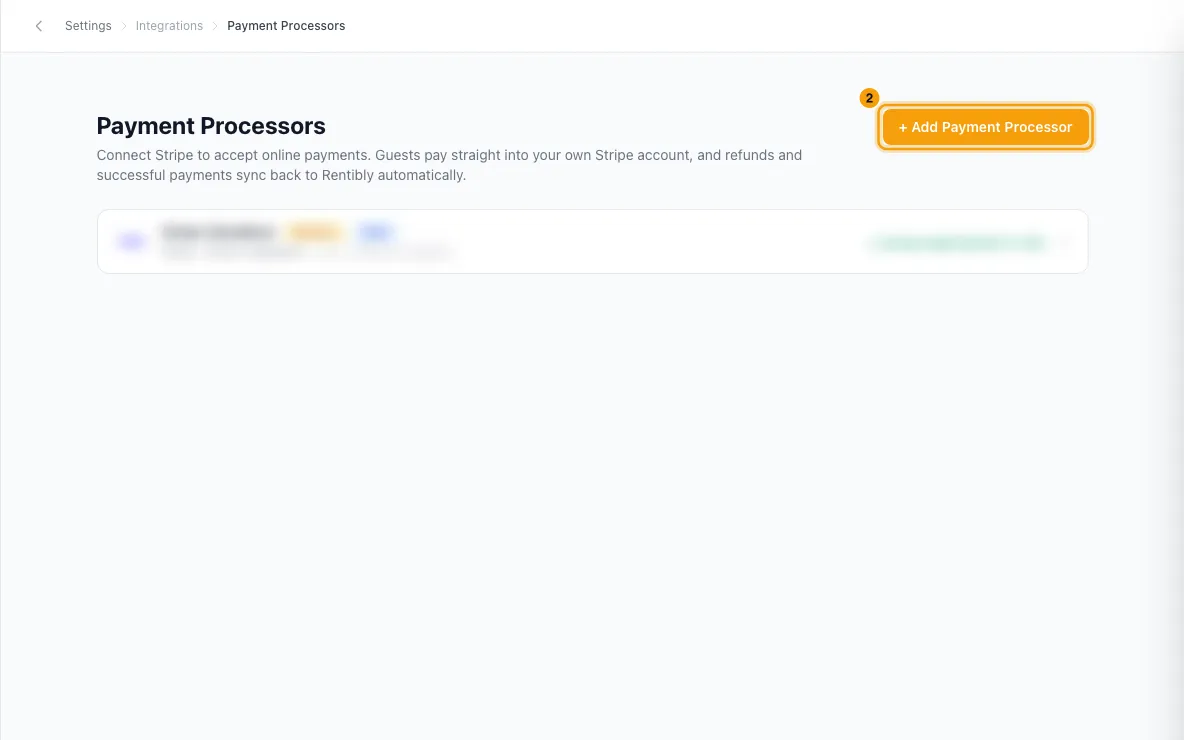
Click + Add Payment Processor (or Connect Stripe if you have none yet), then choose Stripe Connect.
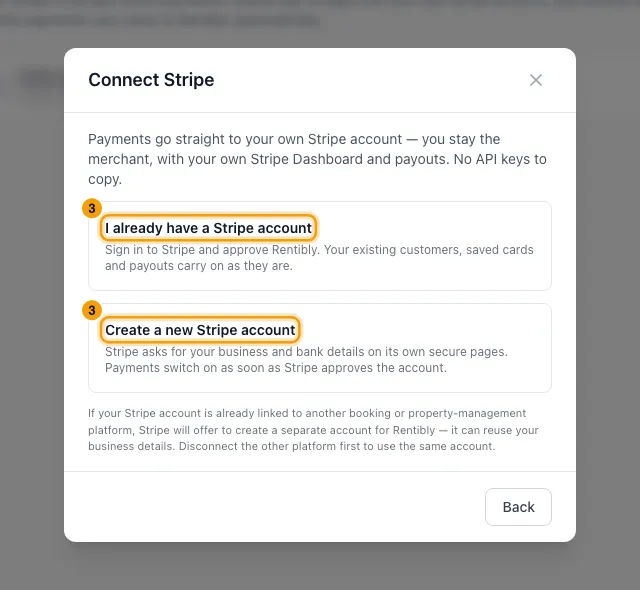
Choose one:
- I already have a Stripe account: sign in to Stripe, pick your account and approve Rentibly.
- Create a new Stripe account: Stripe asks for your business and bank details on its own pages. You can stop and come back.
Stripe brings you back to Payment Processors. When Stripe has approved the account, you see "Your Stripe account is ready to take payments."
If the processor's row says Finish Stripe setup, open it and click Continue Stripe setup.
If you already had this Stripe account connected with API keys, open the new Stripe Connect processor and click Move to Stripe Connect under Move existing payments from "…". Confirm with Move to Stripe Connect.
Then open the old processor and click Remove.
If you have more than one processor, open the one you want to use and click Make default.
Good to know
- Until Stripe lets the account take payments, the processor shows Disabled and nothing charges through it. It switches on by itself once Stripe approves it, and it becomes your Default if you have no other active default.
- The Default processor is the one used when nothing else is chosen, for example payment links and automatic collection of scheduled payments.
- The Live or Test badge shows Stripe's mode. It doesn't tell you whether setup is finished.
- Move to Stripe Connect only appears when the API-key processor is the same Stripe account, in the same live or test mode. It moves saved cards, guest customers, deposit holds, payment links and refunds. The old processor is then switched off and marked Switched over — can be removed. If it was your default, Stripe Connect becomes the default.
- Don't remove the old API-key processor before moving. Until then, its saved cards and deposits keep charging through it.
- If a guest has a different card set up on each processor, the move is blocked. The message names the guests: remove the card saved through Stripe Connect for them, then try again.
- New processors can only be added with Stripe Connect. Adding Stripe with API keys is no longer offered.
- One Stripe account can be connected to only one Rentibly workspace.
- If your Stripe account is already linked to another booking or property-management platform, Stripe offers to create a separate account for Rentibly. It can reuse your business details. To use the same account, disconnect the other platform first.
- Stripe needs more information means Stripe hasn't switched on payments yet. Check your Stripe Dashboard, then click Check again.
- Disconnected in Stripe means Rentibly was removed in your Stripe Dashboard. Click Reconnect Stripe.
- Disable pauses a processor without disconnecting it. Remove → Remove integration disconnects Rentibly from your Stripe account. Your Stripe account itself isn't affected, and past payments stay in Rentibly.
- Wallet payments shows whether guests can pay with Apple Pay and Google Pay on your payment page. If it says Action needed, click Enable wallet payments, or switch the wallet on in your Stripe Dashboard as the message says.
- Payments and refunds made in Stripe sync back to Rentibly automatically.
- You need the Settings permission set to Access.
Rentibly AI can help
- Rentibly AI can't connect Stripe or change payment processors. Workspace settings like these stay in the Settings pages.
Still stuck?
Open Support from your profile menu in Rentibly, or email hello@rentibly.com — we answer fast.