Connect an email account and set signatures
Updated 13 October 2026
Connect a mailbox (for example reservations@yourdomain.com) so guest emails arrive in your team Inbox. Then give the account signatures your team can insert into their replies. This only receives mail; to choose the address your emails are sent from, see Send email from your own domain.
Steps
Click your name at the bottom of the sidebar, then Settings. Under Communication, open Email.
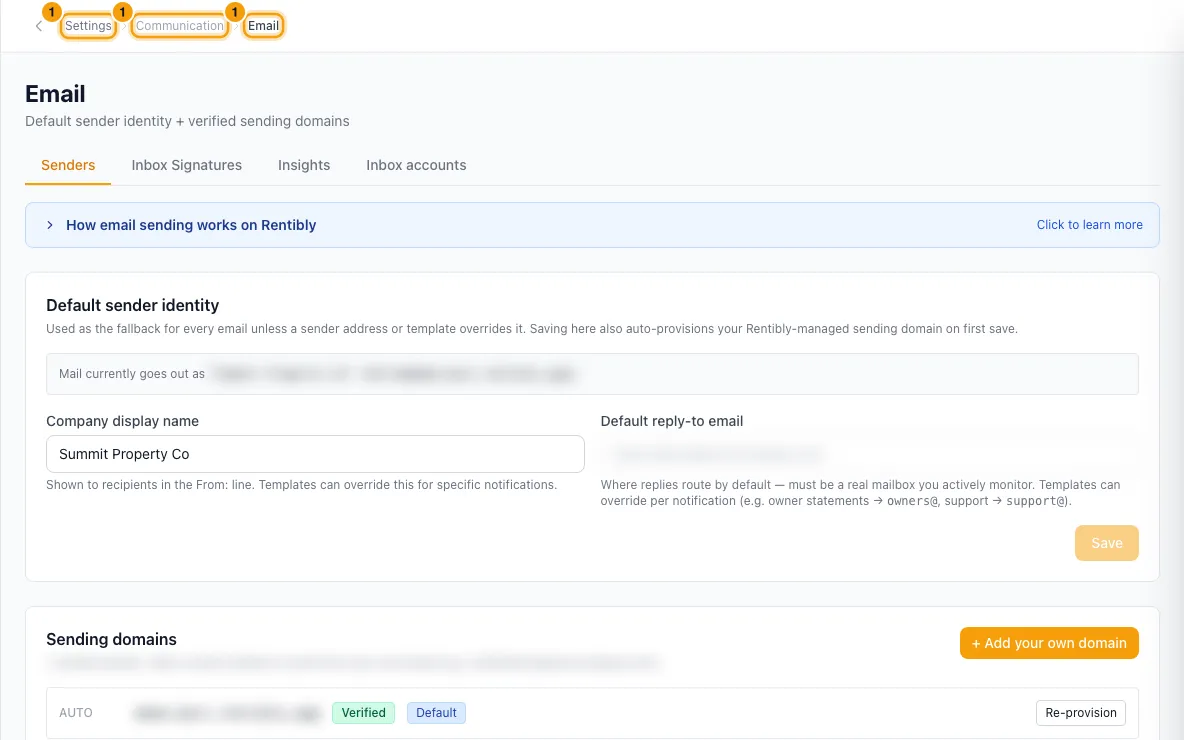
Open the Inbox accounts tab and click + Add inbox account.
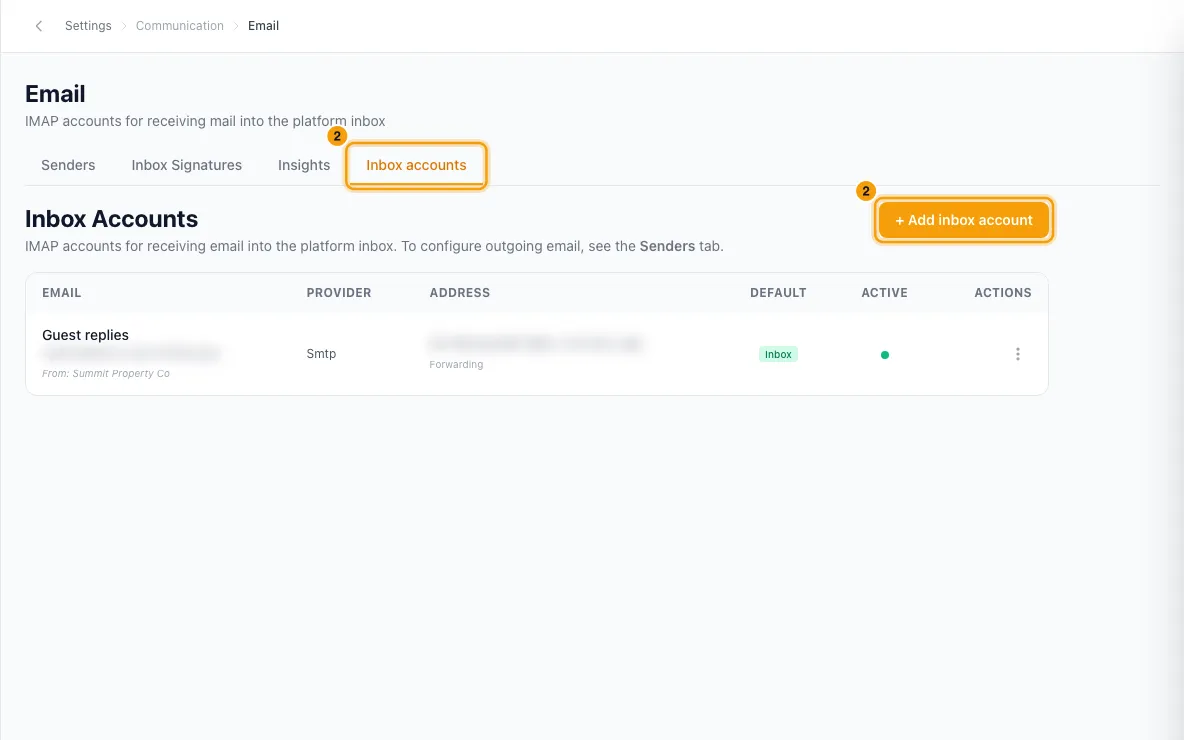
Enter the Account name (the short name your team sees in the Inbox, for example "Reservations"), the Email address and the Display name (the sender name).
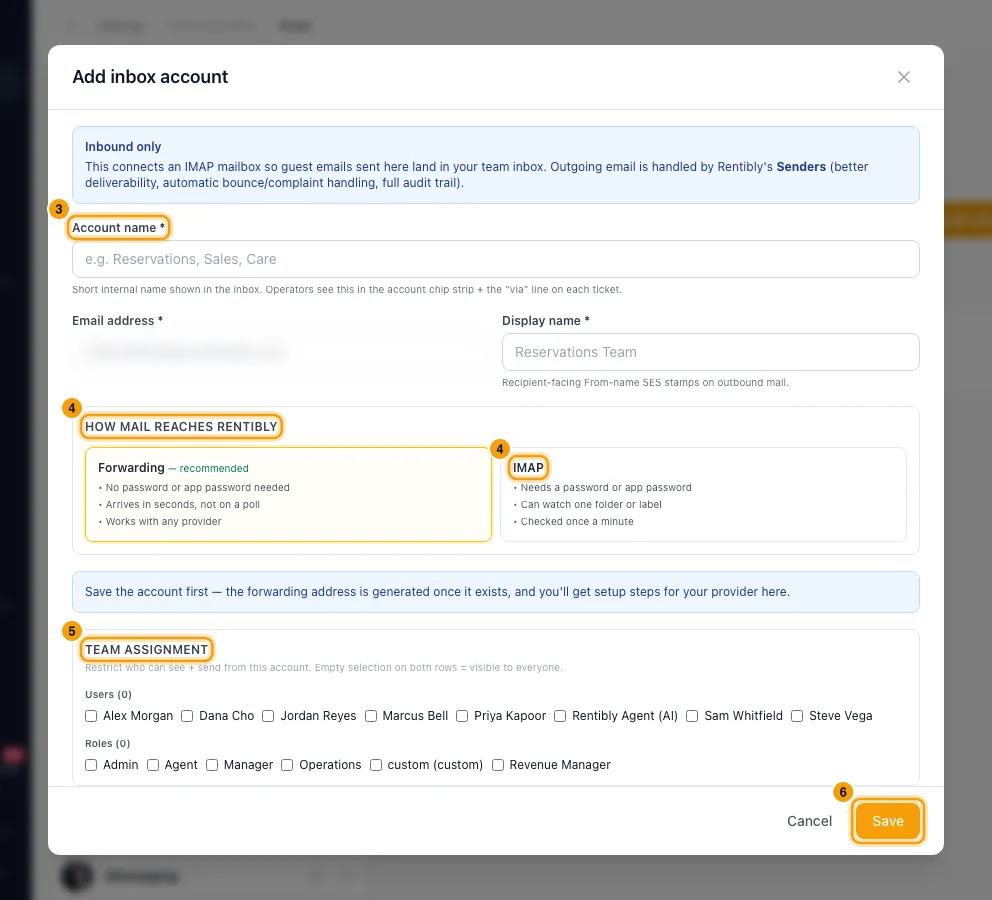
Under How mail reaches Rentibly, choose Forwarding (recommended) or IMAP.
- Forwarding: nothing else to fill in here.
- IMAP: enter the Host, Port, Username and Password, then click Test credentials. When it says Connected, pick the Folder to watch.
Optional: under Team assignment, tick the Users and Roles who may see this account's emails and send from it. Tick Default inbox account to make it the account for guests who have no earlier email thread.
Click Save.
For Forwarding, open the account's ⋮ (Actions) menu and click Edit. Copy the address under Forward your mail here, then follow the Setting it up steps shown for your email provider. The panel says Forwarding is working. once the first email arrives.
To add a signature, open the Inbox Signatures tab. Next to the account, click + Add signature. Enter a Name, write the Body and click Save.
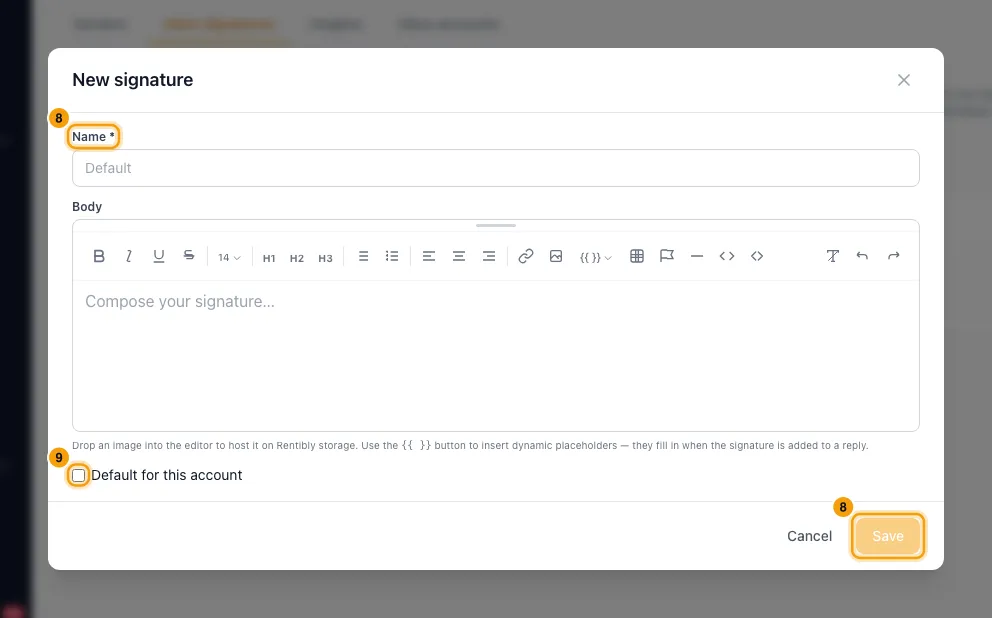
Optional: tick Default for this account on the signature you want added to replies by itself.
Reply to an email in the Inbox. If the account has a default signature, it is already in the reply box below an empty first line. To add a different one, click Insert in the editor toolbar and pick it.
Good to know
- Forwarding vs IMAP: forwarding needs no password and mail arrives within seconds. IMAP needs your mailbox password (or an app password if the mailbox uses two-step verification) and is checked once a minute. The forwarding address is created as soon as you save.
- Microsoft 365: Microsoft has switched off password sign-in for IMAP, so an IMAP connection is expected to fail. Use Forwarding. Microsoft also blocks forwarding to outside addresses by default, so your Microsoft admin must allow it first (the setup steps say how).
- Keep the forwarding address private. Anyone who knows it can send mail into your Inbox. If it leaks, click Issue a new address. The old one keeps working until you click Stop accepting next to it, so switch your provider first.
- Changing the IMAP folder restarts the account from the newest message in the new folder. Mail already in that folder is not imported.
- Accounts can't be deleted, only deactivated: ⋮ (Actions) → Deactivate. Rentibly stops collecting mail from it, and every existing ticket and email stays visible. Click Reactivate to turn it back on.
- Team assignment: if you tick no users and no roles, everyone can see the account. Ticking either limits it to those people.
- Phishing & Spam (in the account window): Show phishing/spam warning banner puts a warning above every email conversation from this account. Auto-detect suspicious email marks suspicious emails with a Likely spam chip; nothing is hidden or closed automatically.
- Advanced — Send through this account's SMTP server is only needed if your company must send through its own mail server. See Send email from your own domain.
- Signatures belong to one email account. The Insert menu shows the signatures of the account you are replying from. You can also manage them on Settings → Inbox → Signatures.
- Placeholders: the {{ }} button adds fields such as {{user.first_name}}, {{account.email}} or {{company.name}}. They are filled in when the signature is added to the reply, with the details of the person replying.
- Default for this account: each account has at most one; ticking it on another signature unticks the old one. It is added only to an empty email reply in the Hub Inbox, once per reply. A saved draft is left as it is, and once you start typing the signature is not changed. After you send, the next reply gets it again. It is labelled "default" in the Insert menu.
- Only email replies get a signature. WhatsApp, website chat and channel (OTA) messages do not. You can delete the added signature from the reply like any other text before sending.
- Images you drop into a signature are stored by Rentibly and can be up to 5 MB each.
- You need the Settings permission set to Access to add or change inbox accounts and signatures. Anyone who can reply in the Inbox can insert them.
Rentibly AI can help
- Rentibly AI can't connect email accounts or edit signatures yet. It can explain these steps.
Still stuck?
Open Support from your profile menu in Rentibly, or email hello@rentibly.com — we answer fast.