Check system health
Updated 13 October 2026
System Health shows whether Rentibly's main services are working or down, any incidents Rentibly has announced, and which WhatsApp accounts, email accounts, payment processors and channel connections your workspace has. Open it when you think Rentibly might be down.
Steps
Go to Settings → System → System Health.
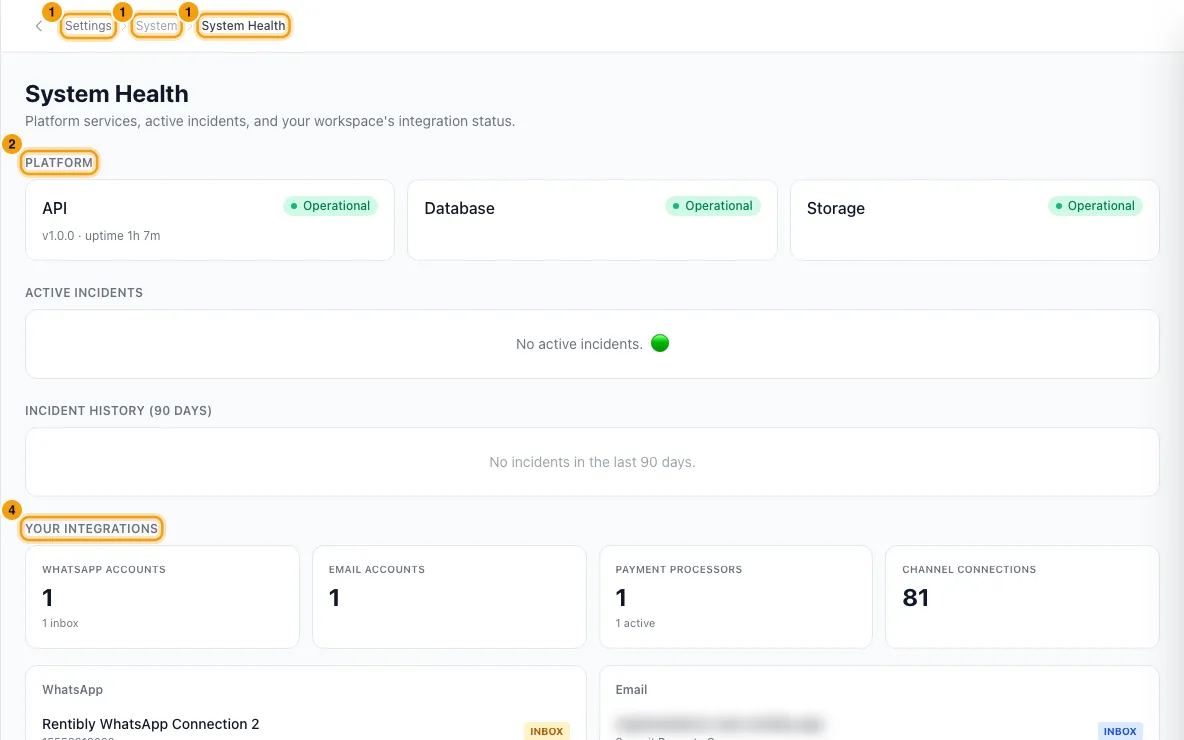
Under Platform, check the API, Database and Storage cards. Each shows Operational or Down. The API card also shows the version and how long it has been running.
Check Active Incidents and Incident History (90 days). Each incident shows its status (Investigating, Identified, Monitoring or Resolved) and when it started. Use ← Previous and Next → to page through the history, 3 at a time.
Under Your Integrations, see the counts of WhatsApp Accounts, Email Accounts, Payment Processors and Channel Connections. Payment Processors also shows how many are active.
Below the counts, the WhatsApp, Email and Payment Processors lists name each connected account. INBOX marks the WhatsApp number used for the Inbox, and DEFAULT marks your default payment processor.
Good to know
- The page checks the services once, when you open it. Reload the page to check again.
- Down on a card means that check failed for the server that answered you. If something looks wrong, contact Rentibly support.
- The incidents are the service-status updates Rentibly posts when something is wrong on our side — the same ones that appear as a banner at the top of the app. An empty list means Rentibly has not announced an incident; it is not proof that nothing is wrong for you.
- Channel Connections counts each property listed on a channel, the same way Settings → Integrations → Channels & OTAs counts them. Disconnected listings are not counted, and your website is not included.
- If a section shows Couldn't load instead of a number, Rentibly could not read it just then. It does not mean you have none — reload the page, and if it keeps happening, contact Rentibly support.
- The page is read-only.
- You need the Settings permission set to Access to open this page.
Rentibly AI can help
- Rentibly AI can't check system health. If something looks broken, ask it to contact Rentibly support and it opens a support request with.
Still stuck?
Open Support from your profile menu in Rentibly, or email hello@rentibly.com — we answer fast.